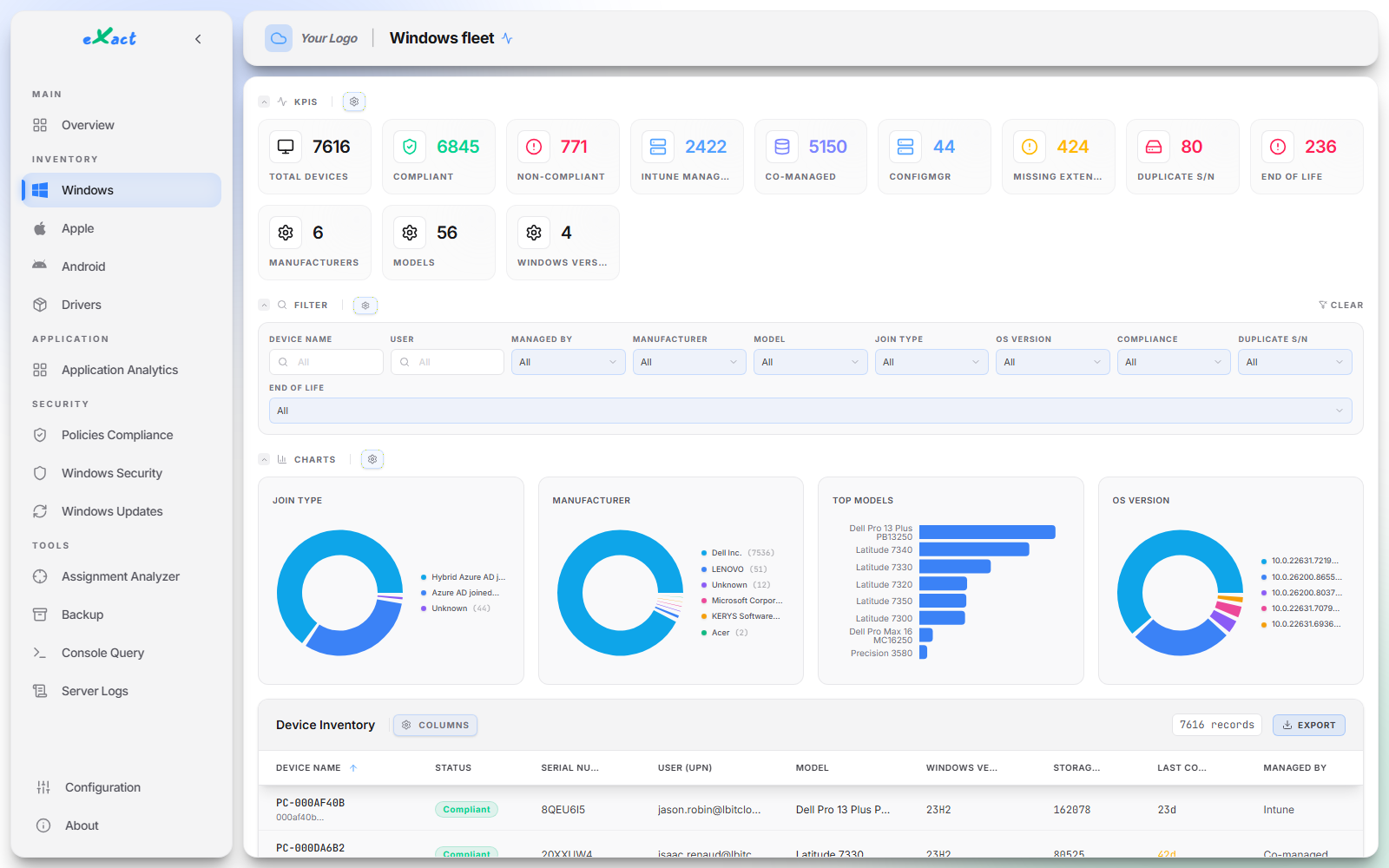
Transform raw Microsoft Intune data into strategic visibility. Inventory exactly the data you need, quickly spot outdated applications, build your own KPIs and charts, and get a complete, real view of your fleet's security.
Microsoft Intune excels at deployment. But the moment you need to audit, prove, or simply know, your teams hit the same nine walls week after week — three of them about inventory.
"Non-compliant", with no reason given
A device turns red. Which of your settings gave way: BitLocker, LAPS, the BIOS? You open the device, then the policy, then the setting. For one device.
Inventory stops where Microsoft decided
You tick properties in a catalogue someone else wrote: what is not in the list does not exist, however urgent it is for you. eXact collects more than 500 per device — BIOS password, battery wear and disk SMART status among them.
No field that looks like your business
Asset tag, cost centre, site, your master image version: nowhere to put them. So no reporting by department, by location, or by budget.
An application inventory with a ceiling
Application inventory stops at a thousand per device and refreshes once a week. On a developer workstation or a shared machine, you stop seeing everything.
"Compliant" does not mean "up to date"
The console confirms the device follows its update ring. It does not tell you how many cumulative updates behind Microsoft’s own releases it actually is.
Which policy, and why?
Which policy reaches this device, and why? You rebuild the answer by hand: group by group, filter by filter, exclusion by exclusion.
Everything needs a script
"Dell devices on 22H2, without BitLocker, seen in the last thirty days." A one-line question that turns into PowerShell, Graph or KQL — so it takes the one person on the team who can.
No historical depth
Reports show today. Proving that your encryption rate improved over six months, or recovering last year’s fleet on audit day: the data is gone.
Nothing to roll back to
A policy deleted by mistake, a profile changed by a colleague: no undo, and no copy of your configuration within reach.
The Visibility Test
Do you really have control?
Ask your teams these 6 questions. If the answer requires crossing multiple Excel files or takes hours of investigation... your MDM no longer protects you, it slows you down.
Patch Management
How many devices are truly up to date in your Windows Update production Ring at this very moment?
Visibility alert
Encryption
What is your exact compliance rate for encryption (BitLocker) across all your workstations?
Visibility alert
Privileges (LAPS)
What is the actual success rate of your Windows LAPS strategy deployment across your equipment?
Visibility alert
EDR Coverage
Can you immediately isolate the list of workstations that do not have corporate EDR installed or active?
Visibility alert
Hardware Security
Can you instantly provide a precise list of workstations with no BIOS password configured?
Visibility alert
Application Hygiene
Can you instantly identify workstations with applications that are not up to date?
Visibility alert
✨Why chooseeXact ?
Because our platform was designed to respond instantly to all these issues. No more searching for data or Excel files, eXact displays it clearly for your entire fleet.
What you get with eXact
Speed, efficiency, productivity
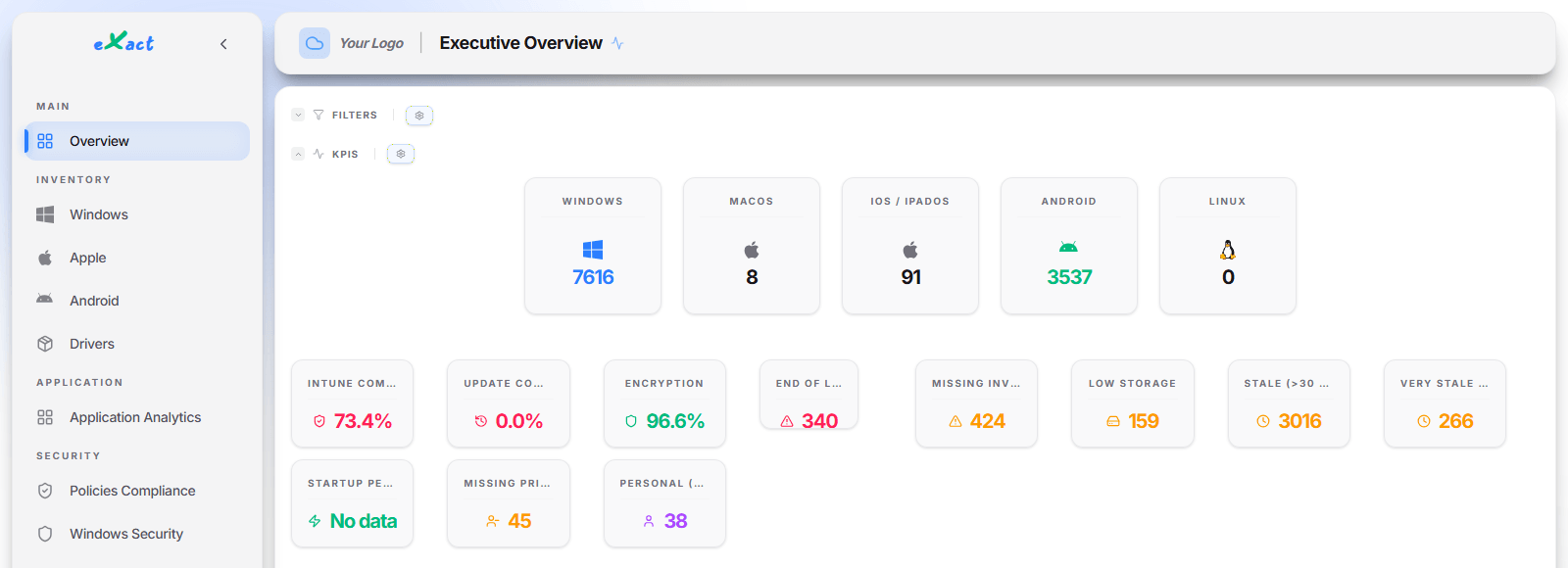
Unified Analytics.Monitor, sort, and export data from your Windows, macOS, iOS, and Android devices in a centralized interface.
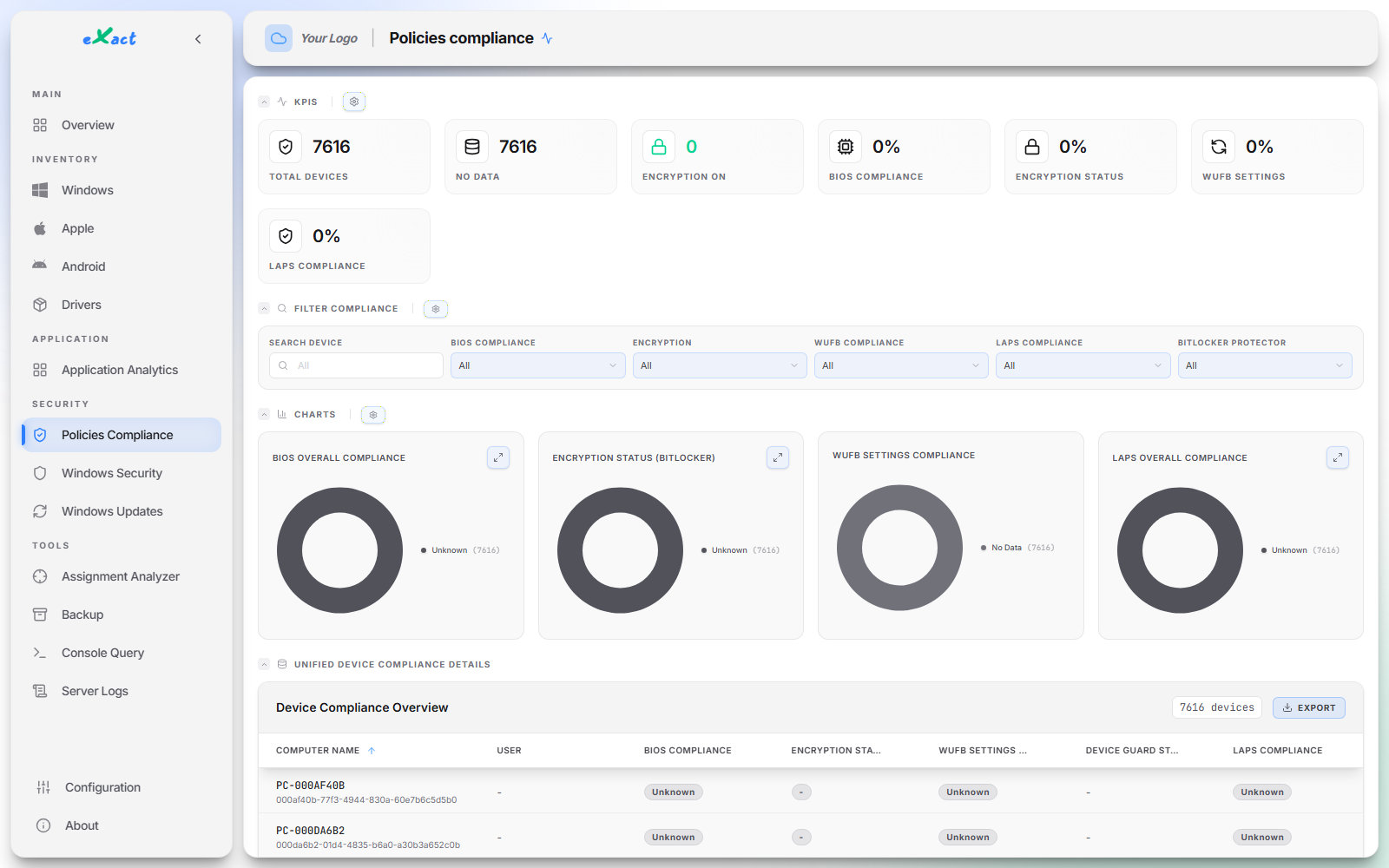
The reason, not just the verdict.Intune tells you a device is "non-compliant" without naming the setting at fault. eXact shows one column per control — BitLocker, Windows LAPS, BIOS, Device Guard, update rings — so you see which one gave way, and on which devices.
Proactive Prevention.Instantly identify missing patches based on your Intune update Ring policies.
Refreshed at every collection
Real device inventory
Inventory & History.Where traditional MDM stops, eXact goes down to the hardware level, thanks to in-depth collection on Windows devices.
A history that outlives the audit.Native reports only keep a limited window: on audit day, last year’s fleet state is gone. Your data lives in your own Log Analytics workspace, with the retention you set — enough to document an ISO 27001 or NIS2 requirement over time, not just on inspection day.
Real fleet health.Precise hardware health indicators: battery wear, disk SMART status. Anticipate hardware renewals.
Intune tells you a policy is "applied". eXact tells you whether the protection is actually active on the machine — and rates every device Secure, At Risk or Critical.
What's actually switched on.19 controls read from every Windows device, from secure boot to exploit mitigations — not a policy’s declared state, the machine’s real one.
Drivers, the classic blind spot.A dedicated page isolates the unsigned, outdated and critical drivers across your fleet — the favourite way in for vulnerable-driver attacks.
Exploit mitigationsDEP, Control Flow Guard, image randomisation (ASLR)
Every control is filterable, sortable and exportable to CSV, device by device.
No scripting required
Inventory exactly what you want
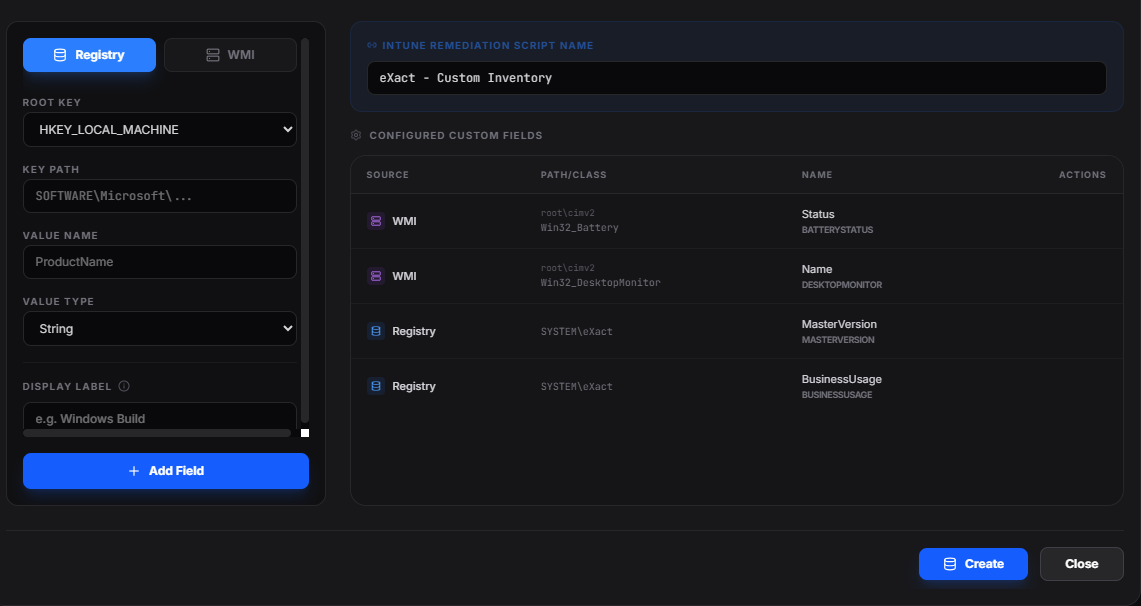
Registry and WMI stop being black boxes: point at the data you are missing, give it a name, and it joins your inventory.
A form, not PowerShell.Pick the registry hive, path and value — or a WMI class —, add a readable label, and the field exists.
The Intune script is generated for you.eXact creates and then updates the remediation script inside your tenant, on your request and with your signed-in administrator rights. Nothing to package, nothing to sign, nothing to maintain by hand.
Treated as native fields.Your fields then show up in filters, columns, KPIs and exports, on par with Microsoft-provided data.
Tailor-made
Your KPIs, your dashboard
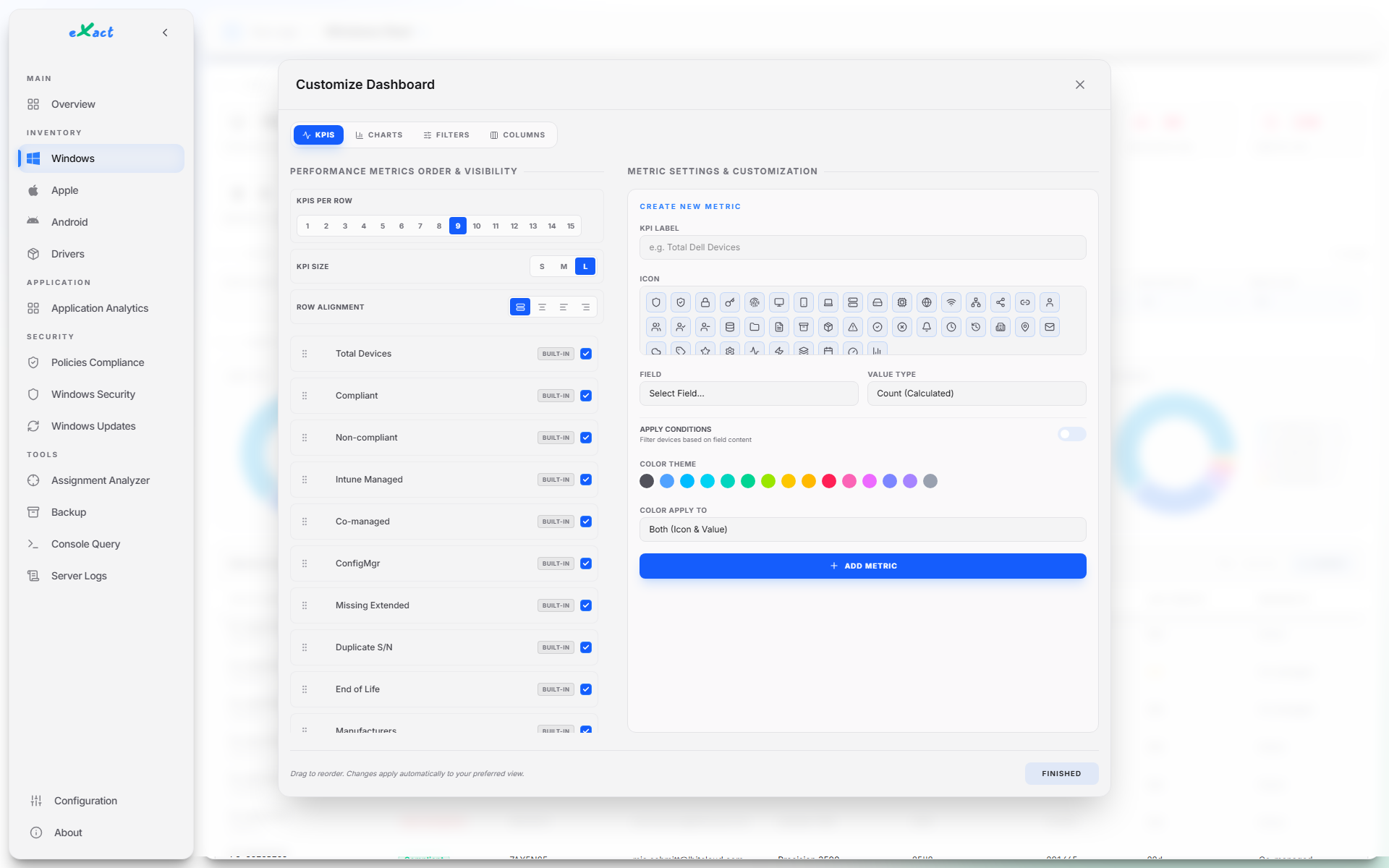
No vendor knows your objectives better than you do. So build the indicators that measure them, without going through us.
Build the KPI you are missing.One field, one value type, one or several conditions: the counter only keeps the devices you are aiming at.
A layout that is yours.Drag and drop, resize freely, hide what you do not need. An icon, fifteen colours, and a light or dark theme that is remembered.
Click a number, get the list.Every counter opens the list of the devices behind it — active filters included — ready to export to CSV.
And this is just the beginning
A complete toolkit, built for IT teams who live in Intune every day.
Assignment Analyzer
Find every device touched by an Intune policy in one click, or the reverse. Spot assignment groups that reach nobody and conflicting policies.
Intune Configuration Backup
Export your entire Intune configuration (profiles, compliance, apps, Autopilot, RBAC...) to a ZIP, on demand or automatically.
End-of-life & duplicates
Instantly spot end-of-life devices (Windows, iOS, Android, macOS) and duplicate serial numbers from cloned images.
Official patch tracking
Every device is checked against Microsoft's official update catalog to know if it's truly up to date, not just 'compliant' per Intune.
Universal CSV export
Export any view in the platform, filtered and sorted your way, in one click.
White-label branding
Customize the interface's logo and colors to match your own visual identity.
Disks running full
A Windows update fails silently on a full disk. eXact isolates the devices that dropped below 10% free space, before the patch gets refused.
The mobile fleet, finally readable
Android security patch level, OS end of support, device ownership, last check-in: your mobile fleet stops being a grey area.
Hybrid estates
Intune, co-managed, ConfigMgr: the real split of your Windows devices, figure by figure — essential while you are moving workloads.
Bandwidth saved
What peer-to-peer caching actually spared you, in the sense Microsoft computes it: the daily history by source — internet, local network, cache server — and a Delivery Optimization tab on every device's record.
A transparent architecture
Your fleet data stays exclusively inside your own Azure tenant: neither LBITCloud nor any third party can access it. No inbound connection to your network, and no on-premises server to install.
Step 1
Smart Collection
A lightweight script runs on devices (via Intune) for in-depth hardware, software, and compliance inventory.
Step 2
Secure Centralization
Data is ingested and processed in Azure Log Analytics, providing massive, secure historization.
Step 3
Reporting & Decisions
Dynamic dashboards turn this data into business indicators you can act on immediately.
In addition to on-device collection, eXact queries Microsoft Graph in read mode for your Intune policies, apps, groups and assignments, and relies on Entra ID for sign-in (SSO). The only write eXact performs in Intune is creating the custom inventory script, on your request and with your own signed-in administrator rights. The script deployed on devices authenticates with a non-exportable certificate: no secret is stored on them, and it only ever writes to your own Log Analytics workspace. The only outbound calls eXact makes go to Microsoft services (Graph, official update and application catalogs) and to our licensing service, which only ever receives your license key — never any fleet data.
Secure by design
A security tool must not become a risk of its own
You are about to give eXact a complete view of your fleet. Here is, concretely, what that involves: no agent, no secret on the devices, no data on our side.
No agent, no inbound flow
Collection is an Intune remediation script, not software to install. No port to open, no gateway, no server to host on premises.
No secret on the devices
The script authenticates with a non-exportable certificate, never a plaintext secret, and it can only write to your own Log Analytics workspace.
Your data in your tenant
The Log Analytics workspace and the Web App live in your Azure subscription, in the region of your choice, with the retention you decide.
Sign-in through your directory (SSO)
Authentication goes through Entra ID: your MFA and conditional access rules apply. Every token is revalidated server-side and access is restricted to your organisation.
Passwordless application identity
Application access can rely on an Azure managed identity: no client secret left to store, share, or rotate before it expires.
Private settings, restrained console
Your KPIs, columns and filters are tied to your own session and invisible to other accounts. The technical console rejects any write query and logs what gets executed.
And because an outage is a risk too: the database is backed up automatically every 15 minutes and on every shutdown, then restored with no intervention.
A clear economic model
A transparent license coupled with your Azure infrastructure.
For 10,000 devices, everything enabled, one collection a day: about 22 GB a month at the public West Europe rate (€2.57/GB, 31 days of retention included), plus a B1 Linux App Service plan. The volume comes from a pass measured on a loaded device; enabling only the base brings it down to 11 GB.
Log Analytics workspace
Azure Web App
Total control over your data
Guaranteed isolation and security
Configurable retention
Frequently asked
What people ask us before signing
Straight answers to the seven questions that come up in every pre-sales conversation.
Does eXact replace Microsoft Intune?
No, and that is not the point. Intune deploys, configures and manages your devices; eXact reads that data, cross-references it with what it reads on the devices themselves, and gives you the view the console cannot produce. None of your policies are modified — the only write eXact performs in Intune is the custom inventory script, which you create yourself from the interface.
Do we need to install an agent on the devices?
No. Collection is a remediation script run by Intune, at the frequency you decide. No third-party software to deploy or maintain, no inbound port to open, no on-premises gateway: the device writes to your Log Analytics workspace, never the other way round.
Is the depth the same across every operating system?
No, and you are better off knowing up front: in-depth collection — hardware, registry, WMI, hardening controls — applies to Windows devices. For macOS, iOS and Android, eXact works from what Intune reports: inventory, compliance, applications, end of life, renewal cycle. Useful, but without the depth of a Windows device.
Where is the data stored, and at what cost?
In your own Log Analytics workspace, on your Azure subscription, in the region you choose. The cost is Azure ingestion, plus the Web App. For 10,000 devices, everything enabled, one collection a day: about 22 GB a month, which is close to €57 of ingestion at the public West Europe rate — €2.57 per GB, 31 days of retention included — plus a dozen euros or so for a B1 Linux App Service plan. Enabling only the base brings the volume down to 11 GB. You control that dial, not us.
Which permissions does eXact need?
Read permissions on your Intune data through Microsoft Graph, the Log Analytics Reader role on your workspace — or an Azure managed identity, which removes any secret to store — and a write permission on scripts, used only when you create your custom inventory. The exact list is provided at installation time.
We manage several tenants. Is that supported?
Yes, through dedicated deployments: one eXact instance per customer tenant, which guarantees by design that no data travels from one customer to another. The interface is white-label — logo and colours — so it carries your identity rather than ours. Our reseller partners work exactly this way.
We already have Power BI and the Intune Data Warehouse.
Then you already know its limits: it exposes the data Intune holds, and nothing more — not the registry, not WMI, not the hardening controls read from the machine itself. It also means a BI project to build and then maintain, with the skills that go with it. eXact brings its own collection, deploys as a single instance, and its KPIs are composed from the interface, without writing a query. And the two approaches are not exclusive: the collected data lands in your own Log Analytics workspace, so it stays queryable in KQL or reusable in your existing dashboards.
What you need to have at hand
No exotic prerequisites: if you already run Intune on an Azure tenant, you have nearly everything.
Microsoft Intune
Enrolled devices (Windows, macOS, iOS, Android)
Remediation scripts enabled, with an eligible license
An administrator account for the initial setup
Azure
A subscription and a Log Analytics workspace
A Data Collection Endpoint and its Data Collection Rule
A Web App — the B1 plan is enough — as a single instance
App Registration
An exposed API: api://<client-id>, scope access_as_user
Microsoft Graph read permissions on Intune
The Log Analytics Reader role, or a managed identity
Devices
Windows 10 or 11 for in-depth collection
A deployed authentication certificate, non-exportable
No agent, no inbound port, no firewall rule
Free tools
Seven free tools to prepare the work
A few questions, no sign-up, none of your data sent anywhere: the arithmetic runs in your browser. Autopilot scenarios, moving from GPOs to Intune policies, leaving hybrid behind, Delivery Optimization, application delivery, a Microsoft 365 licence advisor — and an anonymizer, to hand a meeting summary or a script to an AI without giving anything away.