Take control!
- Entra ID
- SharePoint
- Exchange
- Teams
- Intune
- Purview
- Copilot
- Defender
Save time and money on Microsoft 365: everything in one place, every action in one click.
Same result. Ten times fewer clicks.
- Identities
- Prepare a new employee's arrival
- Secure an employee's departure
- Disable inactive accounts
- Clean up inactive guests
- Invite an external guest
- Reset passwords that are too old
- Devices & Intune
- Sync every device in a group
- Rotate the local admin password
- Block a lost or stolen device
- Disable a device in Entra
- Change a device's primary user
- Rotate a device's BitLocker key
- Restart a device remotely
- Schedule an employee's out-of-office
- Set a mailbox's time zone and language
- Teams & SharePoint
- Create a Teams team and its channels
- Add a channel to a team
- Stop guests from creating channels
- Archive teams older than two years
- Security & Conditional Access
- Spot accounts without MFA
- Lock a hacked account
- Contain a compromised account
- Create a report-only Conditional Access policy
- Put a Conditional Access policy back in report-only
- Defender
- Accept a Secure Score risk, with its reason
- Applications
- Restrict an app to those assigned to it
- Block sign-in to an enterprise application
- Licences & costs
- Reclaim unused licences
- Standards & naming
- Rename policies that break the convention
- Measure NIS2 compliance
- See how a security rule is written
- Find the names that break the convention
- Create a naming rule
- Object view
- Everything about an account
- Add an account to a group, from its view
- Act on an account's device, from its view
- Choose what an object's view shows
- Give an application an owner, from its view
- Everything about a Teams team
- Who is Global Administrator?
- Alerts & reports
- Get alerted, right in Teams
- Send a report to Teams
- Extend Entris
- See how an action is built
The scenario Open the Security dashboard→Click the “Users without MFA” tile→The list of the accounts concernedIn the portals Check user by user
What Entris brings you
Shipped by default, ready on day one
The recommended configuration imports as a single file, and the security rules as one file per framework. Here is what they hold before you have written anything.
| 183 | actions | Revoke sessions, assign a licence, wipe a device, archive a team — from a right-click, on one object or a selection |
|---|---|---|
| 32 | alerts | Administrators without MFA, app secrets expiring within 30 days, automatic external forwarding allowed |
| 8 | reports | Executive summary, weekly identity review, monthly security posture — sent to Teams or by email |
| 41 | object views | A user, a group, a device, a mailbox — and everything tied to it, on one page |
| 294 | indicators | Guest accounts, disabled accounts, licensed but idle: a figure, and the list behind it |
| 231 | charts | Ready on every page; one click on a bar filters the list |
| 195 | filters | Account status, user type, department, country: set above every list |
| 267 | columns across 33 tables | Already chosen and ordered, table by table |
| 360 | security rules | Across 10 frameworks: CIS, CISA SCuBA, NIS2, DORA, NIST, Zero Trust… — the detail below |
| 16 | naming rules | No space in a sign-in name, no device name left at its factory default |
| 4 | dashboards | General, Security, Defender and Purview, Copilot |
This is only a starting point. The only limit is Microsoft Graph: anything Graph can read or do can be added — by describing it to the AI, in the graphical editor, or by importing a JSON file.
See the 183 actions, by object type
Users 55
- Disable user
- Enable user
- Lock down user (disable + revoke sessions)
- Block a risky user
- Contain a compromised account
- Secure an employee's departure
- Revoke sign-in sessions
- Reset password (change at next sign-in)
- Set usage location
- Assign licence
- Remove licence
- Reprocess licence assignment
- Set manager
- Remove manager
- Set department
- Set job title
- Set office location
- Set company name
- Set employee id
- Set employee type
- Set employee hire date
- Set employee leave date
- Set extension attribute 1
- Hide user from the address list
- Show user in the address list
- Set password to never expire
- Restore default password expiry
- Set preferred language
- Set mobile phone
- Set office address
- Set alternate e-mail
- Rename user
- Change sign-in name (UPN)
- Turn off per-user MFA (legacy)
- Enforce per-user MFA (legacy)
- Invite an external guest
- Clean up inactive guests
- Create user
- Create a user and add them to a group
- Create a user and assign a licence
- Prepare a new employee's arrival
- Delete user
- Add selected users to a group
- Remove selected users from a group
- Add selected users to a directory role
- Remove selected users from a directory role
- Set an out-of-office reply for a user
- Schedule an out-of-office reply for a user
- Turn off a user's out-of-office reply
- Edit any user property
- Disable inactive users since 180 days
- Onboard a user
- Move to another department
- Update HR details
- Issue a Temporary Access Pass
Groups 28
- Create group (security)
- Create group (Microsoft 365)
- Create a security group and add a member
- Create a Microsoft 365 group and add a member
- Delete group
- Renew group
- Rename group
- Set group description
- Hide group from the address list
- Show group in the address list
- Allow external senders to e-mail the group
- Block external senders
- Auto-subscribe new members to conversations
- Stop auto-subscribing new members
- Set group visibility
- Set the dynamic membership rule
- Pause dynamic membership processing
- Resume dynamic membership processing
- Add a member to the group
- Remove a member from the group
- Add an owner to the group
- Remove an owner from the group
- Add selected groups to a group
- Remove selected groups from a group
- Add selected groups to a directory role
- Remove selected groups from a directory role
- Assign a licence to the group
- Remove a licence from the group
Intune managed devices 28
- Sync managed device
- Reboot managed device
- Shut down managed device
- Retire managed device
- Wipe managed device
- Fresh start (keep user data)
- Block a lost or stolen device
- Remote lock managed device
- Locate managed device
- Enable lost mode
- Disable lost mode
- Reset device passcode
- Bypass activation lock
- Rotate BitLocker recovery keys
- Rotate the local administrator password (LAPS)
- Run a Defender quick scan
- Update Defender signatures
- Rename managed device
- Set notes on the managed device
- Mark device as company-owned
- Mark device as personally owned
- Set the device's primary user
- Remove the device's primary user
- Remove a user from a shared Apple device
- Sign out the active user of a shared Apple device
- Run a remediation script on demand
- Delete the managed device record
- Sync every Intune device in the group
Entra ID devices 11
- Disable device
- Enable device
- Delete device
- Set device extension attribute 1
- Add selected devices to a group
- Remove selected devices from a group
- Add a registered owner to the device
- Remove a registered owner from the device
- Add a registered user to the device
- Remove a registered user from the device
- Create device
Teams 11
- Archive team
- Unarchive team
- Add a member to the team
- Remove a member from the team
- Stop members deleting channels
- Let members create channels
- Stop guests creating channels
- Restrict Giphy content to strict
- Turn off Giphy, stickers and memes
- Create a Teams team with its channels
- Add a channel to the team
Enterprise applications 10
- Block sign-in to the service principal
- Allow sign-in to the service principal
- Require user assignment
- Stop requiring user assignment
- Add selected service principals to a directory role
- Remove selected service principals from a directory role
- Add an owner to the enterprise application
- Remove an owner from the enterprise application
- Add selected service principals as owners of an application
- Remove selected service principals from the owners of an application
Mailboxes 8
- Set an out-of-office reply
- Schedule an out-of-office reply
- Set an internal-only out-of-office reply
- Turn off the out-of-office reply
- Set the mailbox time zone
- Set the mailbox language
- Set the mailbox working hours
- Set the mailbox date and time format
Conditional Access policies 7
- Disable Conditional Access policy
- Enable Conditional Access policy
- Switch Conditional Access policy to report-only
- Create Conditional Access policy (report-only)
- Delete Conditional Access policy
- Rename Conditional Access policy
- Create a trusted IP named location
Defender alerts 7
- Mark alert in progress
- Resolve alert as a true positive
- Resolve alert as a false positive
- Resolve alert as expected activity
- Reopen alert
- Assign alert
- Comment on alert
App registrations 5
- Rename application
- Add an owner to the application
- Remove an owner from the application
- Restrict the application to this tenant
- Delete application
Intune configuration policies 4
- Create Intune configuration policy (unassigned)
- Assign the policy to a group
- Unassign Intune configuration policy
- Delete Intune configuration policy
Secure Score recommendations 4
- Mark recommendation as risk accepted
- Mark recommendation as resolved by a third party
- Mark recommendation as planned
- Clear the recommendation's marking
Directory roles 3
- Add a member to the role
- Remove a member from the role
- Activate a directory role
Custom detection rules 2
- Turn custom detection rule on
- Turn custom detection rule off
Counted in Entris' recommended configuration and its rule files, as shipped.
A console your way
-
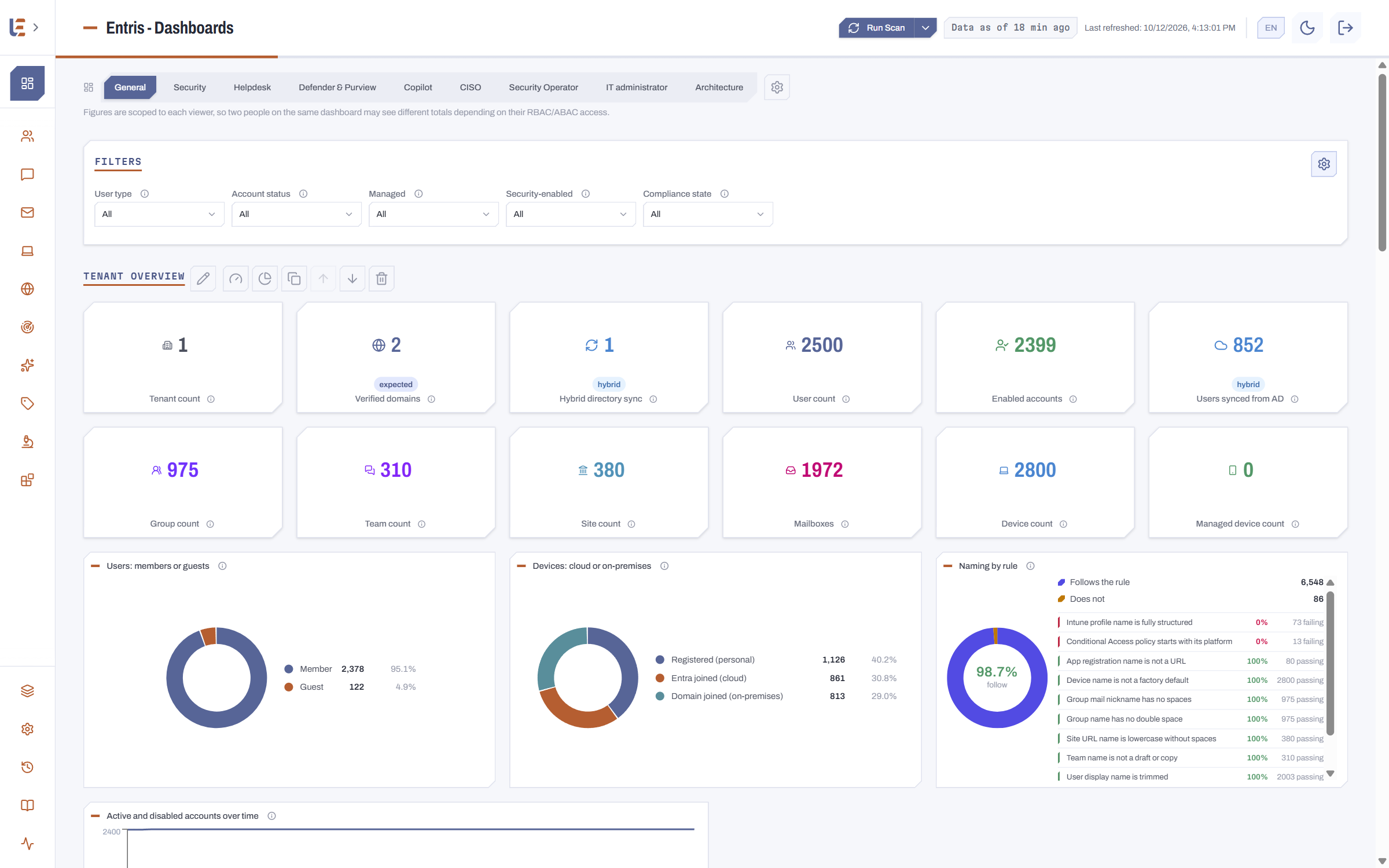
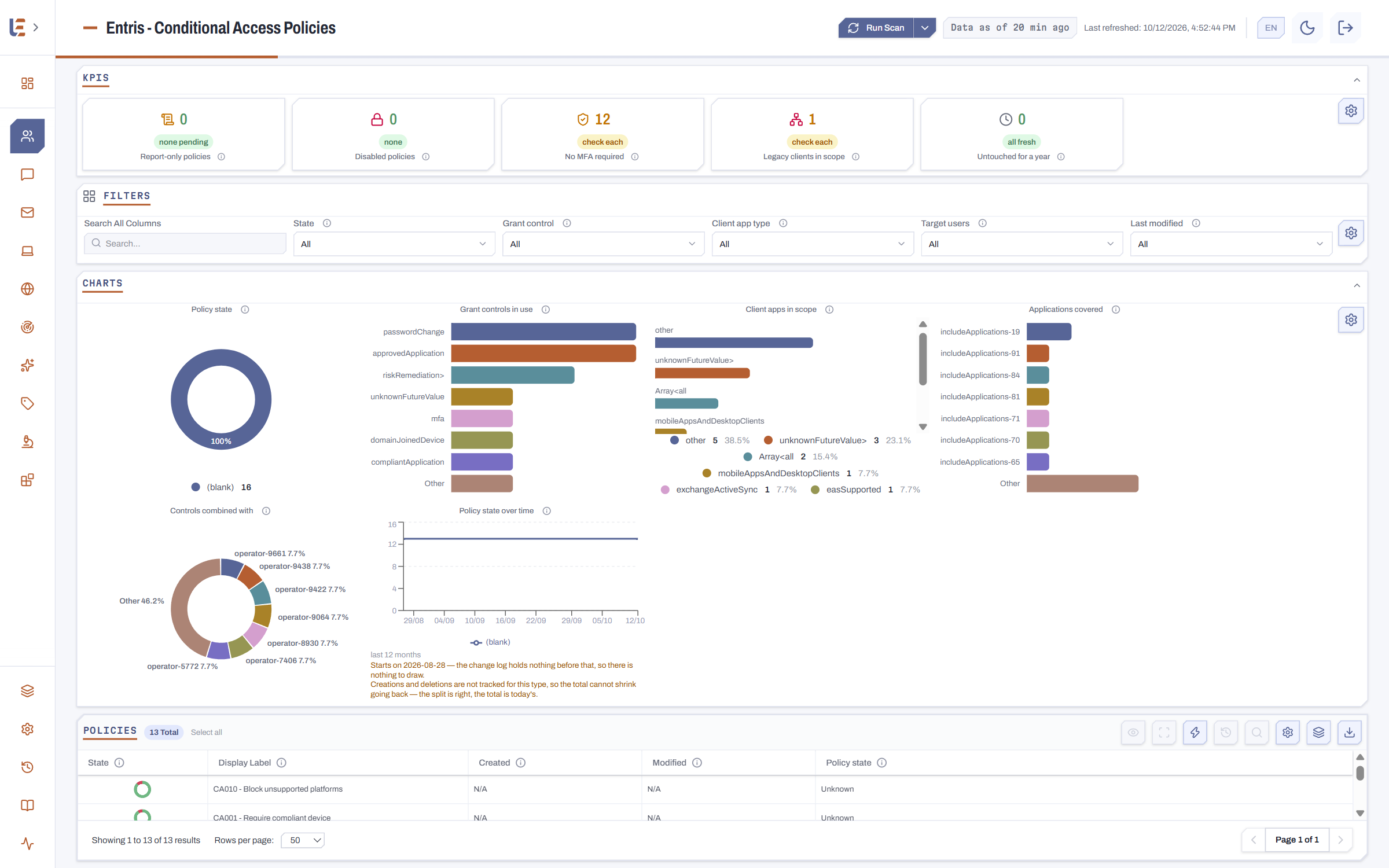
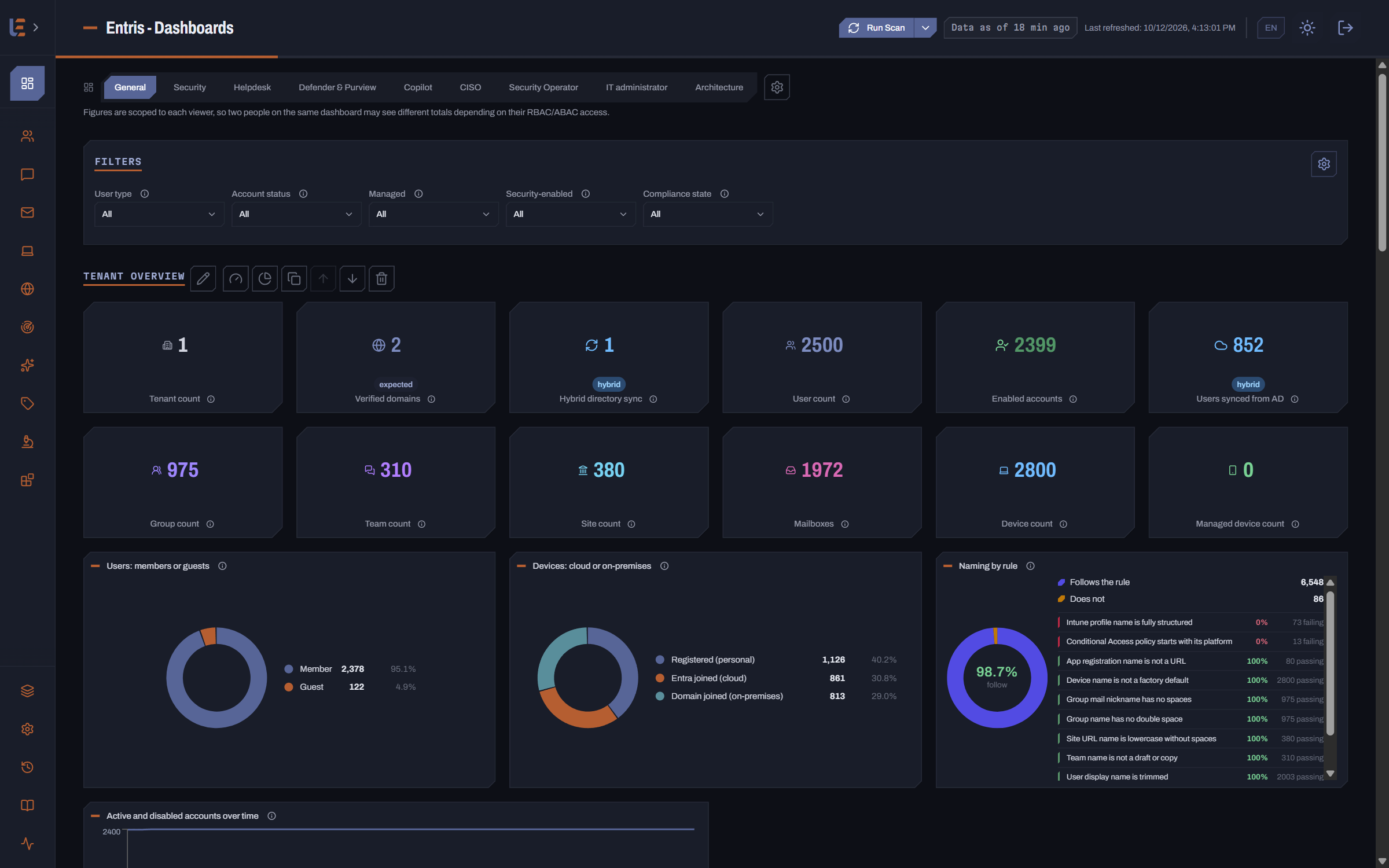
Dashboards and views Your metrics, your columns, your filters — saved as views and replayed identically on every scan.
-
Charts built in the interface A type, some series, a filter: the chart is built without writing a query, and dropped on the page you care about.
-
Alerts and reports What you watch becomes an alert; what you show becomes a report, delivered to Teams or by email, as PPTX, PDF, Excel or Markdown — each recipient in their own language. And to hand an analysis to an outside AI, an export anonymizes the document before it leaves: the organization, its domains, people and objects replaced by pseudonyms that stay the same throughout, and counts rounded.
-
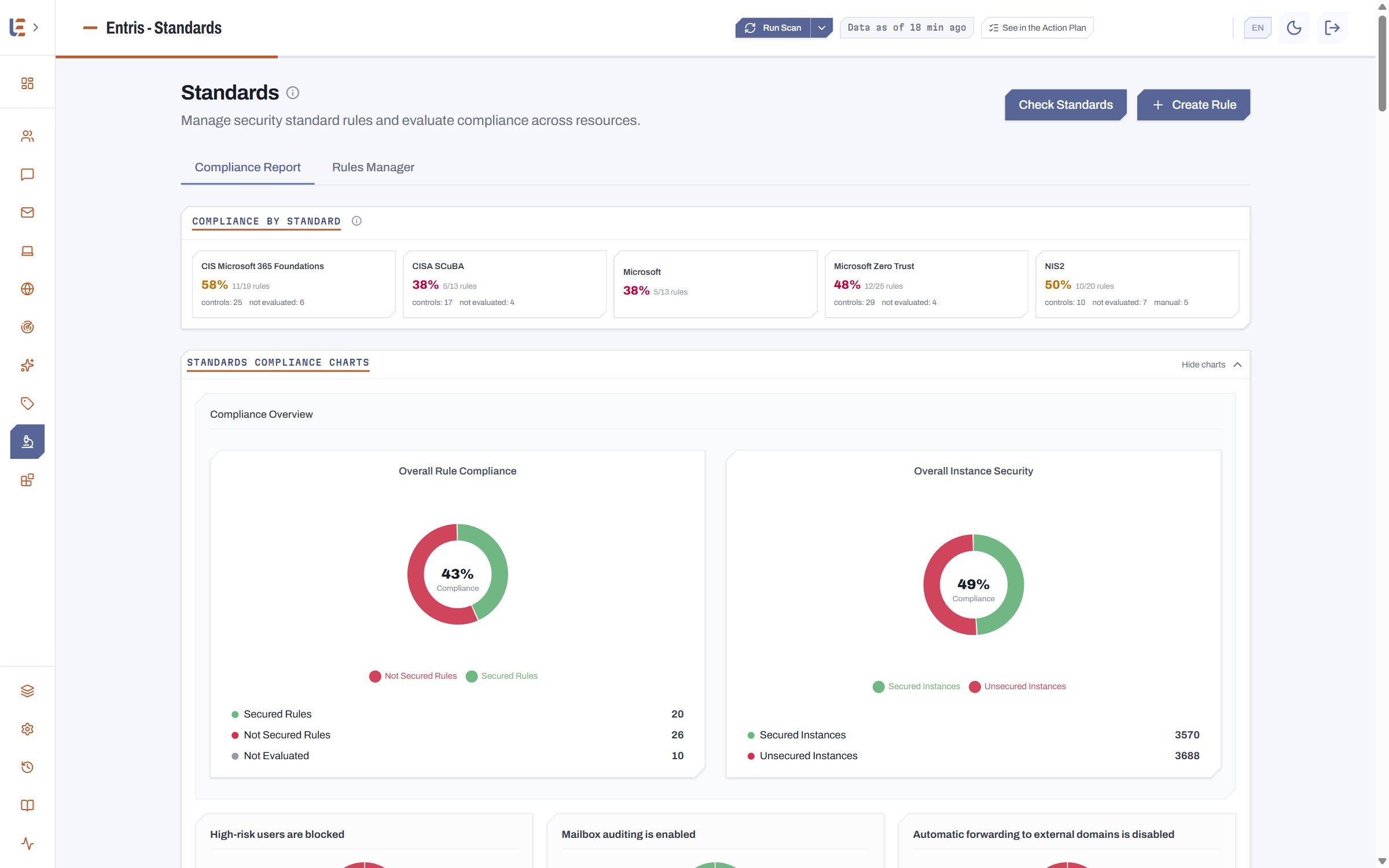
Rules and recommended values Every property is compared to the value you settled on, tenant-wide, on every scan — and the gap reads without opening a record.
-
As many dashboards as you need One per function rather than a single one for everyone: private, or shared to whoever you choose — the helpdesk does not see the CISO's dashboard.
-
Describe it, Entris builds it One sentence — a review of external access — and Entris composes the tiles, the headings and the explanations. Same for a naming rule: the sentence becomes the pattern.
Nothing is fixed: tiles, filters and columns are defined from the interface.
And it acts
-
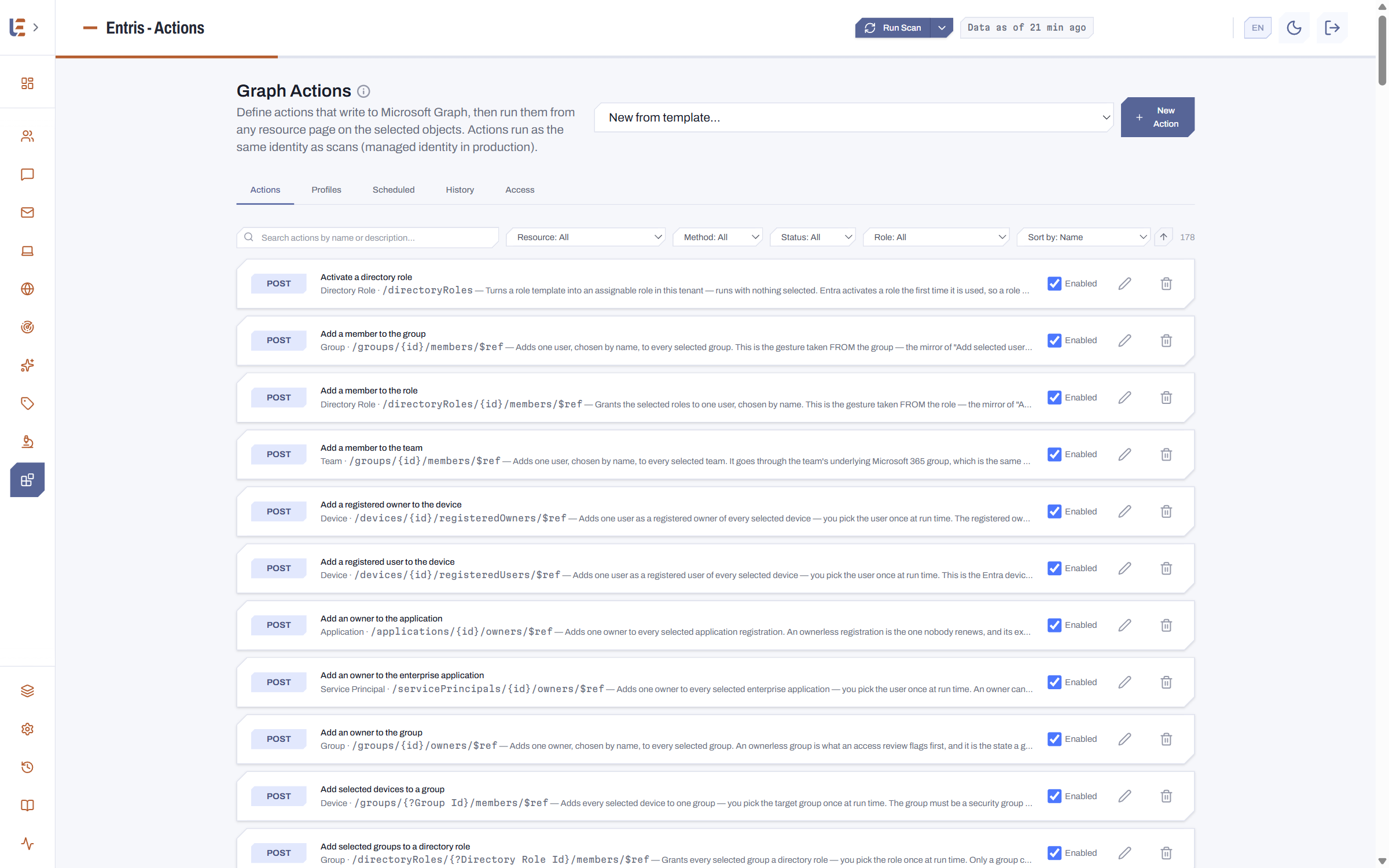
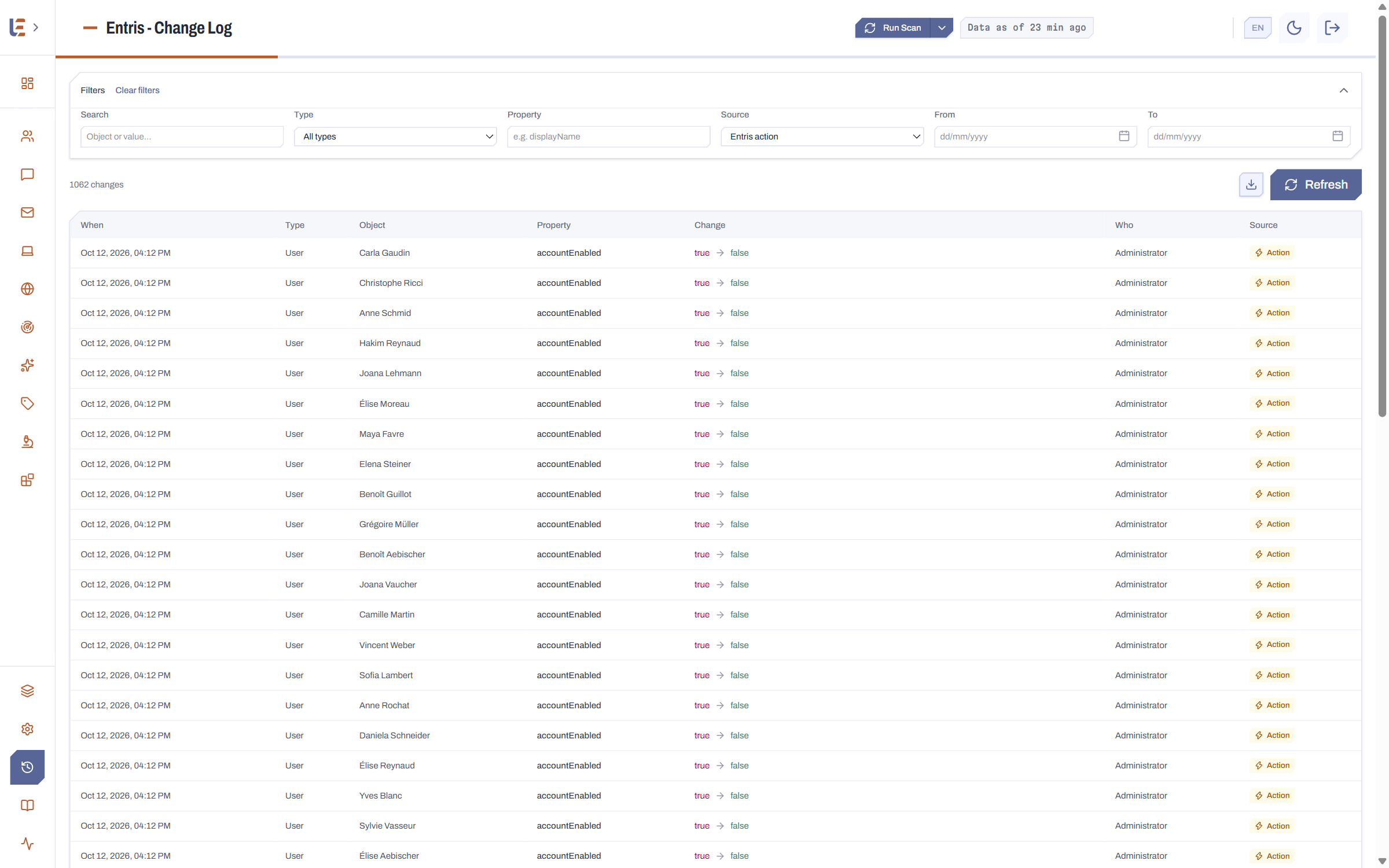
Create, fix, rename, delete Create a user and attach them to their groups and teams, fix a non-compliant setting, rename to the convention: from the very list where you found it.
-
A configurable action library Actions do not arrive fixed: you create them, you edit them, and you decide who may run them and on what.
-
In bulk, but guided The selection, a preview of what will change, the confirmation, then the result object by object.
-
Logged Who ran what, on which objects, with what result — kept, and readable as before-and-after.
One click. On the tenant. Logged.
Every security rule, tied to its standard
-
Recognised frameworks CIS, CISA SCuBA, NIS2, DORA, Zero Trust, Microsoft Cloud Security Benchmark, NIST, and Microsoft Secure Score itself: ten recognised frameworks today, and a rule carries every one of its matches at once.
-
One score per framework, not a single grade You see where you stand framework by framework, and which gaps pull which one down.
-
And your own requirements An internal requirement is added as one more rule, evaluated at the same moment as the rest.
One check = one rule. Two frameworks that speak about the same setting point at the same rule, never at two. These mappings are drawn up by LB IT Cloud from each framework's public text; they are not validated or endorsed by the framework publishers.
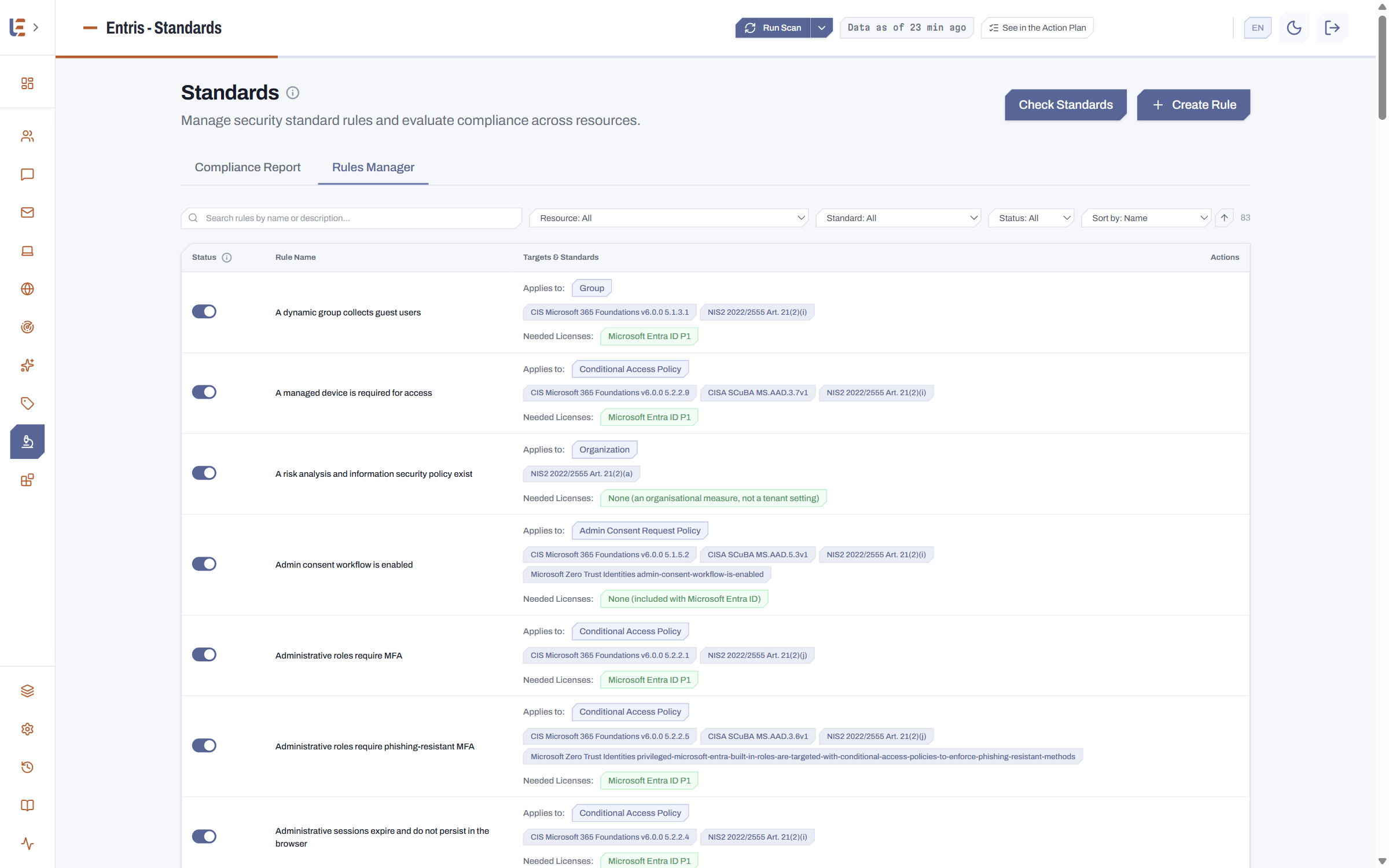
360 security rules, 10 frameworks
Each rule checks one setting and cites every framework that asks for it: when CIS, CISA and NIS2 speak about the same setting, it is one rule. For each framework, here is how many rules cite it and how many of its controls they cover.
| Framework | Version | Rules citing it | Controls covered |
|---|---|---|---|
| NIST SP 800-53 | Rev 5 | 360 | 21 |
| Microsoft Zero Trust | 7 pillars | 159 | 158 |
| CISA SCuBA | ScubaGear v1.8.0 | 133 | 134 |
| Microsoft Cloud Security Benchmark | v2 | 123 | 52 |
| DORA | Regulation (EU) 2022/2554 | 52 | 8 |
| NIS2 | Directive (EU) 2022/2555 | 49 | 10 |
| Microsoft Secure Score | As of 27 Sept 2026 | 45 | 42 |
| CIS Microsoft 365 Foundations | v6.0.0 | 31 | 31 |
| NIST SP 800-63B (authentication) | Rev 4 | 14 | 9 |
| Microsoft Entra group best practices | 27 May 2026 | 11 | 11 |
A rule cites between two and nine frameworks — 238 cite two, 122 three or more — hence totals above 360. The rules import with the recommended configuration, one file per framework.
The Action Plan: what to do, in what order
One prioritised list, in place of fifty Microsoft recommendations burying your own findings.
Three families, one screen
Microsoft Secure Score's recommendations, your framework rules that Secure Score does not measure, and your best practices: each in its own place, never blended into one shared score.
Microsoft's score, and how it moves
The Secure Score history, points to gain recommendation by recommendation, and a product bought but not deployed flagged as such — rather than counted as work outstanding.
Your frameworks linked to Microsoft's score
Each recommendation carries the matches drawn between your rules and Microsoft's controls: CIS, SCuBA, NIS2, DORA, Zero Trust and the other frameworks it covers show up directly on it.
Nothing is decided on this page
Every card links back to Secure Score or your standards, where the fix actually happens; the plan says what to do and in what order, never in your place.
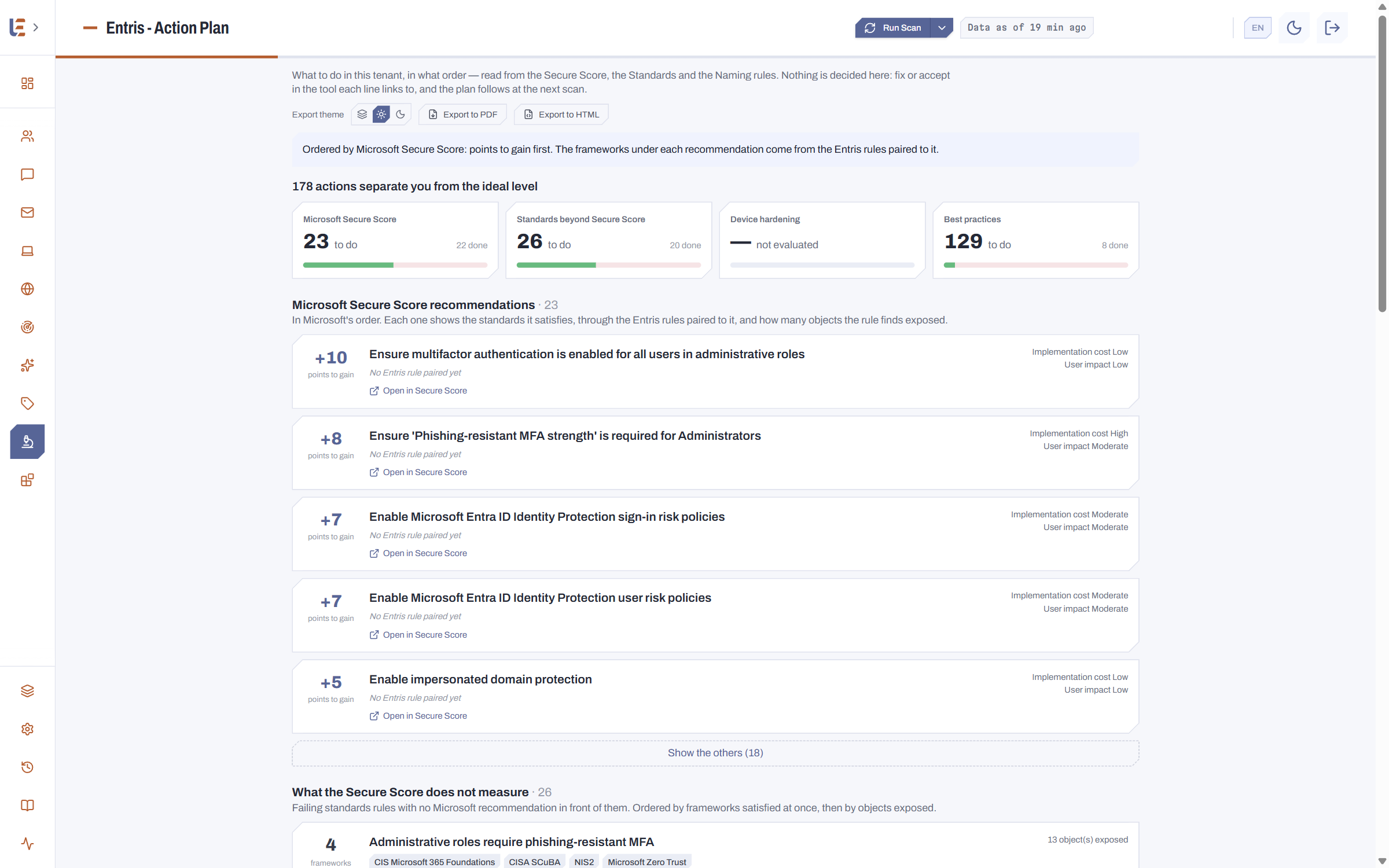
PDF and HTML export included: a document to share without opening Entris.
What no Microsoft console does.
Four things no portal offers — and that you therefore cannot prove today.
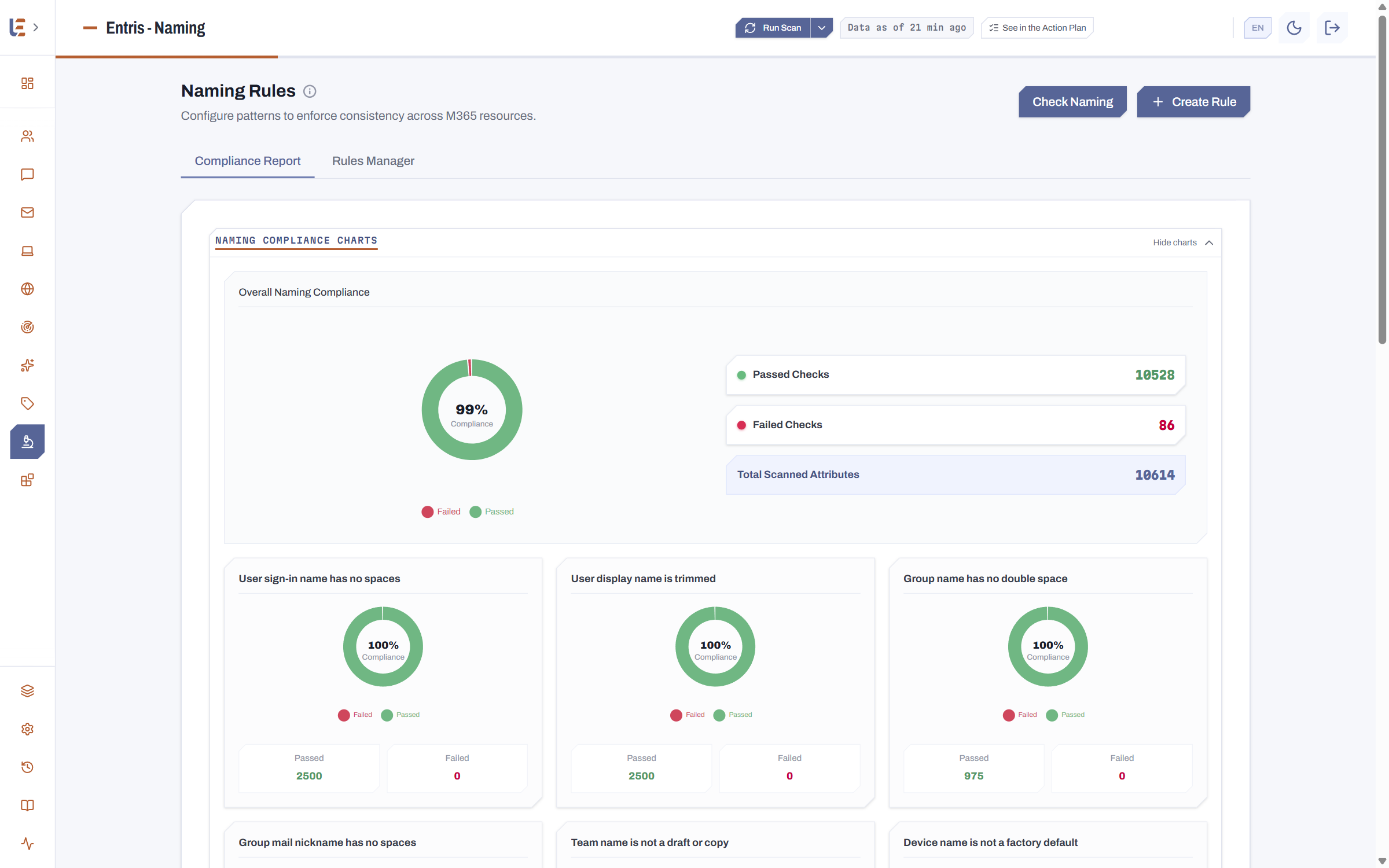
A naming convention, across every resource type.
Natively: no check at all, at best a policy limited to Microsoft 365 groups.
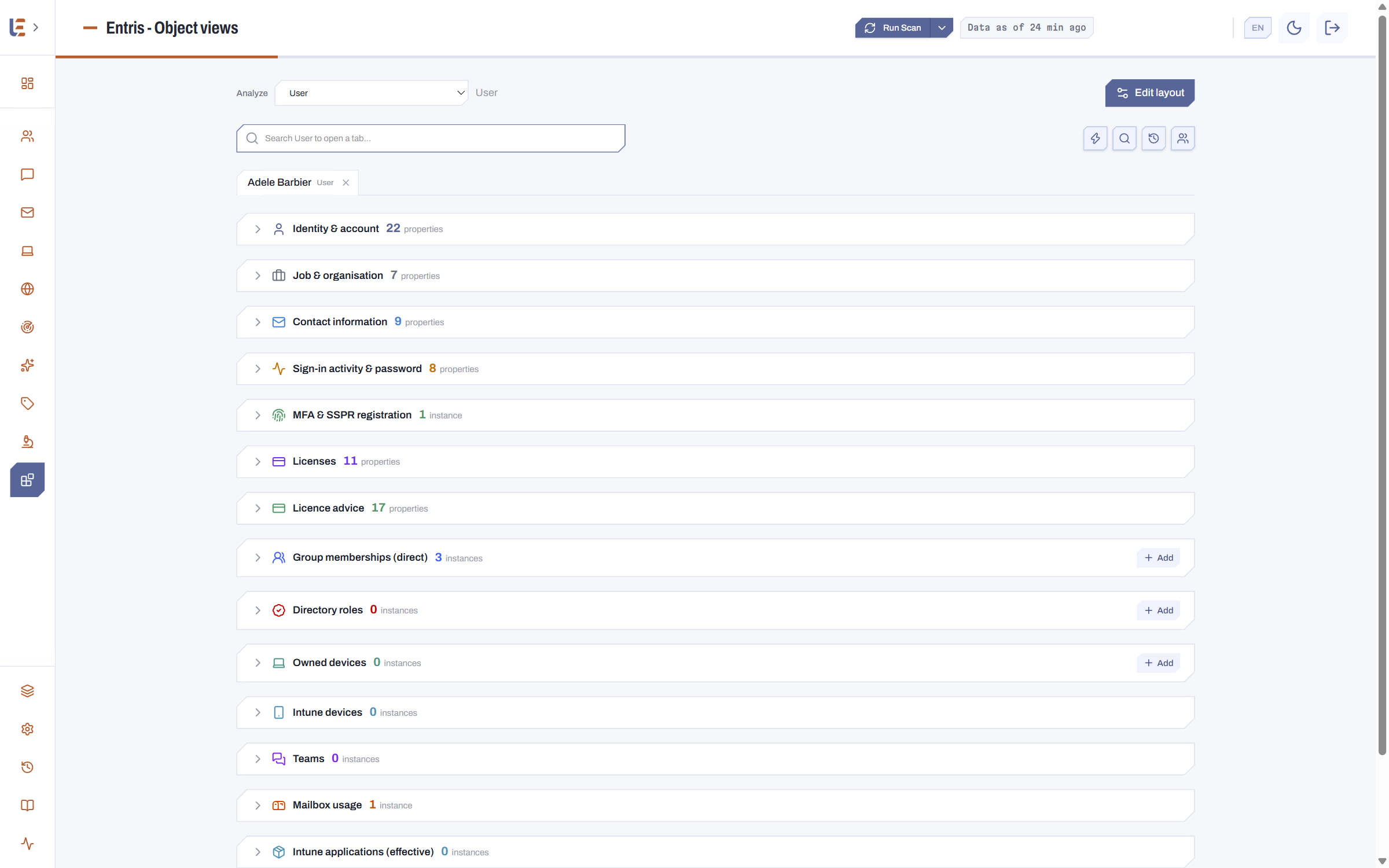
One object and everything tied to it, in one view.
Natively: as many screens as there are services, and no link between them.
Your own security standards, evaluated continuously.
Natively: Secure Score grades its own checklist — never yours.
A bulk action, guided and logged.
Natively: PowerShell — no confirmation, no automatic record.
What Microsoft doesn't do either.
And that's not all.
- Custom reports, sent to Teams or by email
- Custom alerts, sent to Teams or by email
- Change history, kept 365 days by default and adjustable
- Multi-tenant connection, several clients in one console
- Custom RBAC and ABAC
- PIM support, remaining time shown to the user
- Actions applied to one or many users at once
- Fully custom actions, on any object type
- Rollback available after an action
- Permissions received and held, for any object
- Licence management and analysis: seats held, idle and missing
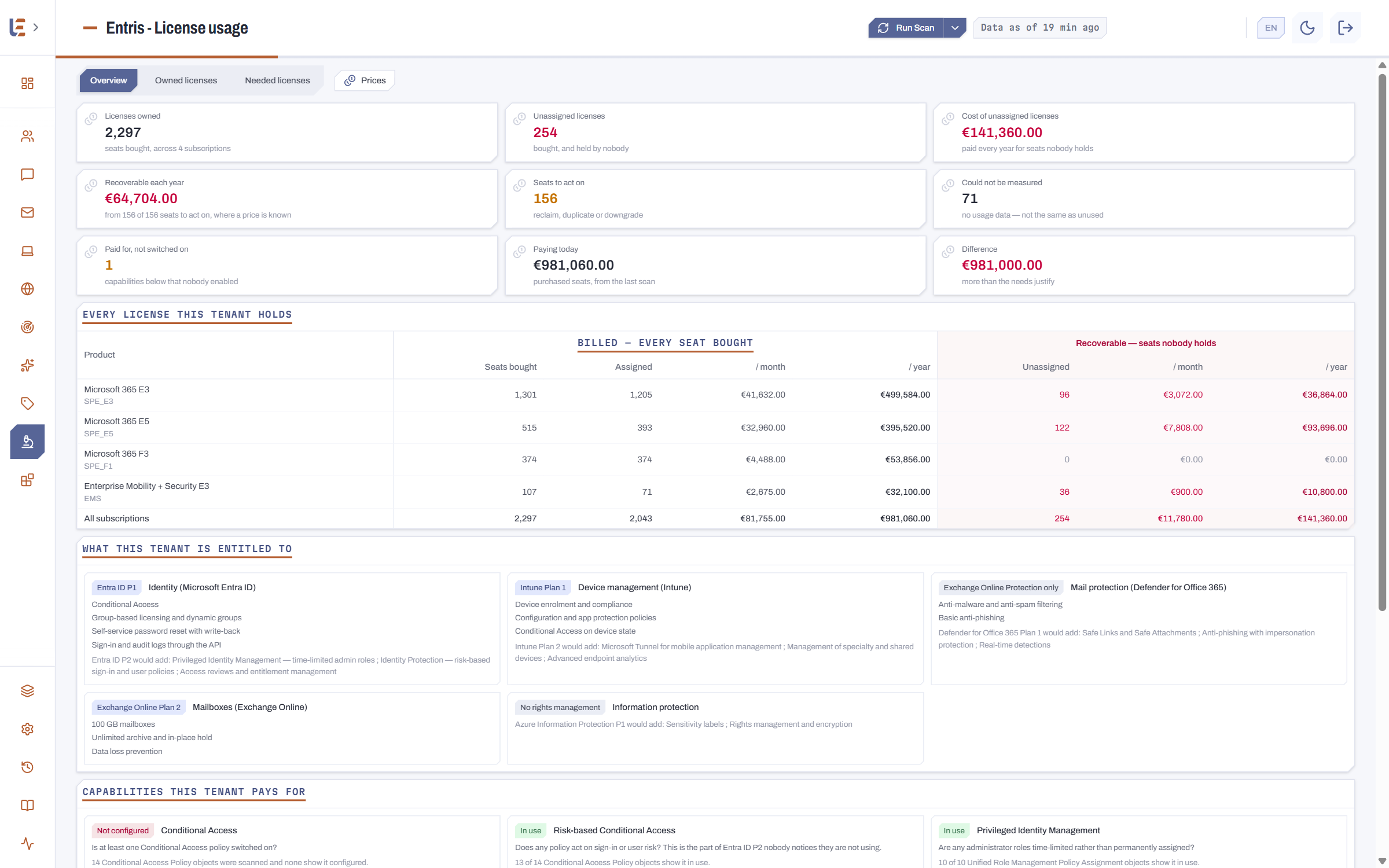
The list goes on.
An administration tool must not become a way in
Entris installs in your own tenant and reads by default. What it may write is your decision.
Below, the Diagnostics page itself: the application's health grade, its own risk self-assessment, the activity and scan history — exportable as PDF or HTML.
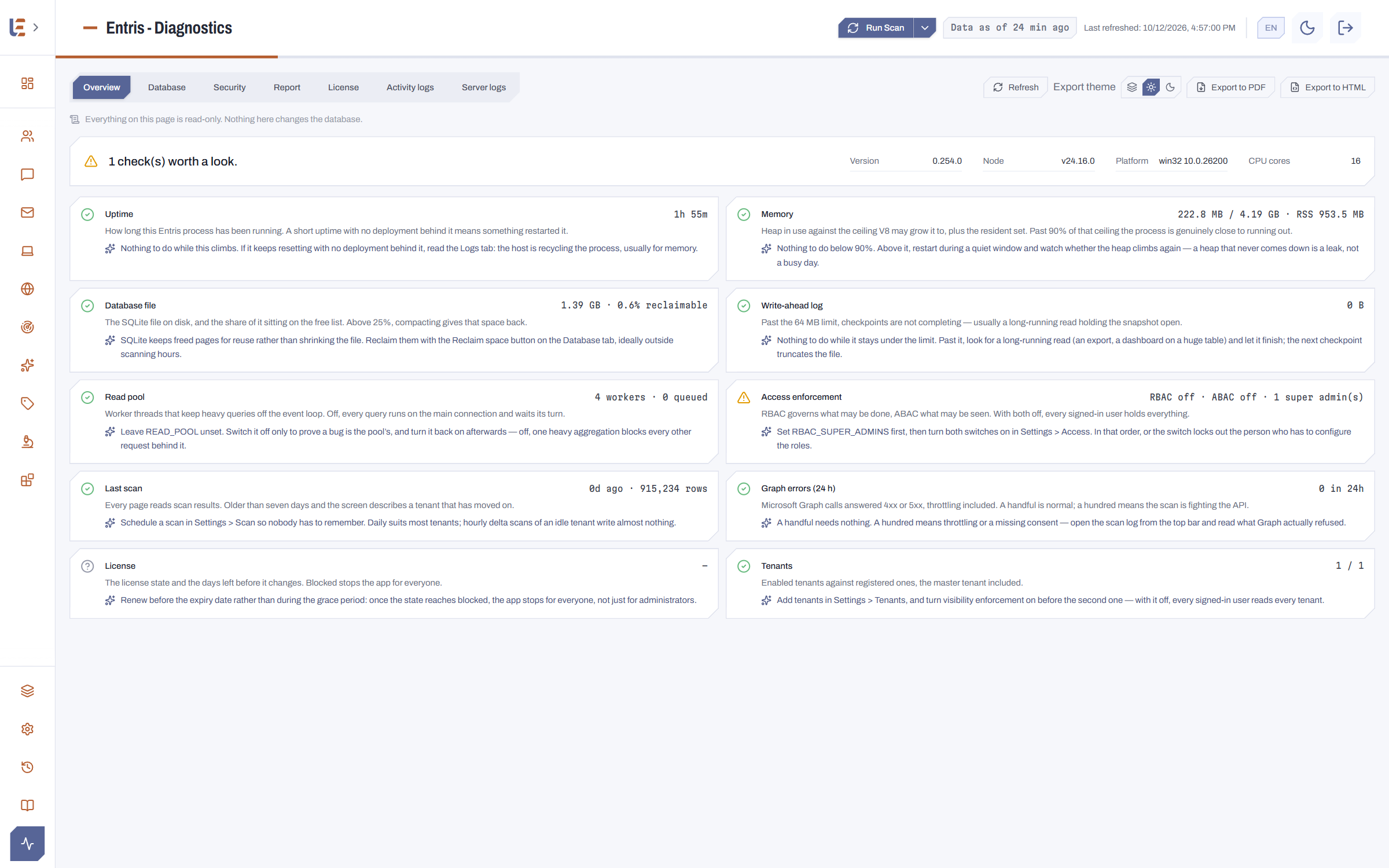
And the settings: automatic backups you can restore, and who may view, export or act.
In your tenant, not ours
Entris runs in your own Azure subscription and writes to your own database: your configuration data never leaves your tenant.
Read by default
A scan reads. Writing takes an action, run by somebody entitled to it, on objects they are entitled to see.
Sign-in through your own directory
Access goes through Entra ID, with your conditional access policies and your MFA. Entris handles no passwords.
A passwordless application identity
In production, Entris authenticates to Microsoft Graph with a managed identity: no secret to store, and none to rotate.
Rights by role and by scope
Roles say which verbs, access policies say over which scope — both are active from the first boot.
Every change dated
Change tracking keeps the before and the after of what Entris read, and of what it changed.
What we are asked before signing
Does Entris replace the Microsoft portals?
No, and that is not the aim. The portals remain where Microsoft defines its settings; Entris reads what they hold, compares it to the values you settled on, and gives you the overall reading — then, if you decide so, the action that fixes it.
Is anything installed on the endpoints or in the network?
No. Entris reads Microsoft Graph and the Exchange and Teams administration endpoints from your own Azure subscription. No agent on the endpoints, no on-premises gateway, no inbound port to open.
Does Entris write to my tenant?
Only when somebody runs an action. The scan itself only reads. Every action is attributed, confirmed before it runs, and kept with its result.
Does this need a Global Administrator?
Not to use Entris: access is set by role and by scope, and most teams only need to read. Consent for the application permissions is given once, at installation, by an administrator.
Where is my data?
In your own subscription: the application, its database and its logs. We host nothing on your behalf, and no configuration data flows back to us.
How long does it take to start?
Provisioning is scripted and the first scan runs the same day. The recommended configuration — tiles, filters, columns — is imported as a single file.
Seven free tools, starting with licences
A few questions, no sign-up, no data sent: the calculation runs in your browser. The licence advisor names the right licence for each profile and what it costs; the others put figures on an Autopilot project, a move from GPOs to Intune policies, an exit from hybrid, update distribution and application delivery, or anonymize a text before you hand it to an AI.
Ready to see what your tenant actually holds?
Ask for a demonstration: we answer within two working days.